Well, well, well.
Let me start with the positives of this laptop. It is absolutely gorgeous, for one. I got this laptop the summer before I came to college, and at first I was a little put off by its aesthetics. It looks like something from the 90s. However, after having had it for two years, my impression of it has grown remarkably. The very reason I didn't like it before is why I can't stand any laptop other than it now -- all these 21st century laptops we see nowadays are sleek, curvy, glossy, like race cars. In other words, they scream immaturity. Lenovo's Thinkpad, in contrast, is boxy and dull black -- and it looks durable (which it is). It screams SHARP; using a Lenovo makes one look like they're serious business. Compare it to the latest Dell flagship, the Studio XPS 16:
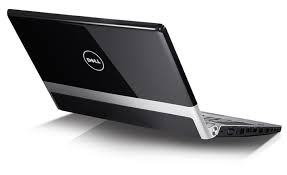
What is going on here? It's got this artsy white stripe going across the front, a huge Dell logo, shininess abounds...I could go on, but the point is to just notice how its aesthetics look, dare I say, dull in comparison to the Thinkpad's uniquely mundane appearance.
Moving on, to the insides of the Thinkpad...
I recently purchased a Solid State Drive to replace the hard drive I've had in my Thinkpad since I first got it. I was expecting a hassle to open up the case, with screws all over the place and all that jazz -- but that was not to be. Upon examining the bottom of the laptop, there is a symbol clearly indicating which screw had to be removed to remove the hard drive. It turns out, there was all of one screw to remove the plastic encasing the hard drive enclosure. From there, the drive literally just pulled out -- evidently, Lenovo was thoughtful enough to use a hot swap system to store the drive. This means that there absolutely no screws to take off before the drive would come out. I literally pulled it right out by a small plastic tab on the drive. The process of putting in the solid state drive amounted to sliding it right in. No issues whatsoever. No problem even getting the rest of the system to recognize the drive. Everything...just...worked. It's not often I get to say that about computer hardware.
For the last few months, the 'D' key on the Thinkpad keyboard hadn't been working, so I did the sensible thing and ordered a new keyboard (some people might be silly enough in the same situation to replace the whole machine). This time, there were five screws to unscrew from the bottom of the case. After taking them off, the keyboard lifted right out, and it was a mere one connection to undo to take it out. Installation of the new one was just as easy.
So, overall, Thinkpad mechanics and aesthetics are both an A+. Now, onto the less than good -- the battery. Both appearance-wise, and usability-wise. First of all, even though I've highly praised the aesthetics of this laptop, or maybe because of the overall amazing aesthetics, the battery sticks out like a sore thumb. It's rounded and sticks out past the end of the actual laptop. If it weren't for the battery, the laptop would be a perfect rectangular box. Luckily, the battery is hidden behind the screen most of the time it's being used.
The other problem with the battery is that it lasts, at best, about two hours. Granted, this laptop is about two years old now, but the battery I'm using is brand new. The best battery life these days peaks around 12 hours, around 6 times better than what my little thing is capable of. It's frustrating to be required to have my charger with me at all times. Ideally, the battery could be charged at night and, in the morning, the laptop would be ready for a whole day's worth of use. Alas, it was not to be for this one.
Overall, the Thinkpad was definitely designed with the user in mind.


